Practice Modes
Alongside the two competitive modes (X01 and Cricket/Tactics), the game-mode picker lists a Practice section for solo skill-building, and a separate Party section for casual multiplayer games. Selecting any of these still goes through the same lobby flow — choose a scoring method, pick your board, and start.
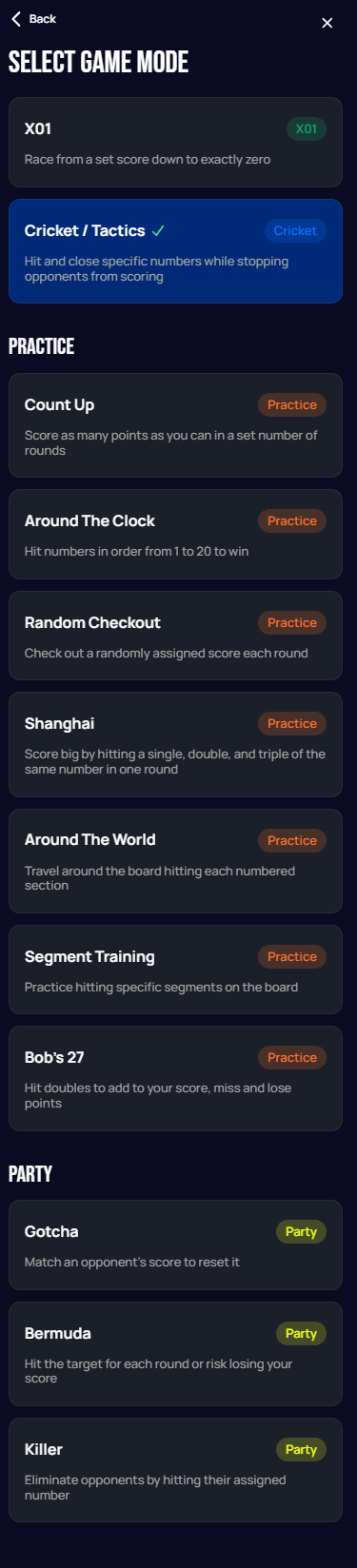
This page covers the seven Practice modes. See Party Modes for Gotcha, Bermuda, and Killer.
:::info No Bot opponent Unlike X01 and Cricket/Tactics, none of the modes on this page support playing against the built-in Bot. You can still play any of them against another person — locally on the same board (a "guest" player) or online against another player. :::
Count Up
Score as many points as you can in a set number of rounds.
How to play: Score as many points as you can across a set number of rounds. Each player throws three darts per round, and all points — singles, doubles, and trebles — are added to your running total. The player with the highest score after all rounds wins.

| Setting | Options | Notes |
|---|---|---|
| Max Rounds | 7 / 8 | How many rounds each player throws. |
The screenshots below show a Count Up match against a local guest — each player's card sits beside the board and tracks their running total, leg average, and match average as the game goes:
 Personal data redacted
 Personal data redacted
 Personal data redacted
Around The Clock
Hit numbers in order from 1 to 20 to win.
How to play: Hit numbers in order from 1 to 20. Players throw three darts per round and must hit the current target number to advance to the next. Only the exact number counts — doubles and trebles do not advance you multiple steps. The first player to hit all 20 numbers wins.

| Setting | Options | Notes |
|---|---|---|
| Mode | Full / Outer Single / Single / Double / Triple | What kind of hit is required to advance — Full accepts any hit on the number (single, double, or triple), while the others restrict advancing to that specific segment type. |
| Order | 1-20-Bull / 20-1-Bull / Random-Bull | The sequence of targets: ascending, descending, or shuffled — all ending on the bullseye. |
| Hits | 1 / 2 / 3 | How many successful hits on the current target are needed before advancing to the next number. |
Whichever number you currently need is highlighted on the board with a slow pulsing yellow overlay:
 Personal data redacted
 Personal data redacted
:::note The counter doesn't tell you which number is next The count on your card always starts at 1 and simply goes up by one each time you finish the required hits on a target — it does not indicate which segment you need next. Played in reverse order (20 down to 1), the counter looks exactly the same; only the highlighted segment on the board tells you the actual target. :::
 Personal data redacted
 Personal data redacted
Random Checkout
Check out a randomly assigned score each round.
How to play: Each round, you are assigned a random checkout score. Use your three darts to reach exactly that number, finishing on a double or the bullseye. Check out successfully to score the round. The player who checks out the most rounds — or first reaches a target number of checkouts — wins.

| Setting | Options | Notes |
|---|---|---|
| Checkout Min | 2 / 41 / 61 / 81 / 101 / 121 / 141 / 161 | The lowest possible score that can be randomly assigned. |
| Checkout Max | 40 / 60 / 80 / 100 / 120 / 140 / 160 / 180 | The highest possible score that can be randomly assigned. |
| Out Mode | Straight / Double / Master | The type of segment required to finish the assigned checkout. |
| Max Rounds | 1 / 2 / 3 / 6 / 9 | How many rounds (checkouts) the game runs for. |
Shanghai
Score big by hitting a single, double, and triple of the same number in one round.
How to play: Each round targets a specific number (1 through 7 or more). Score by hitting that round's number — singles, doubles, and trebles all count. A "Shanghai" — hitting a single, double, and triple of the same number in one round — wins the game instantly. If no Shanghai occurs, the player with the highest total score at the end wins.

| Setting | Options | Notes |
|---|---|---|
| Mode | 1-20 / 1-7 | Whether the round targets cycle through numbers 1–20 or just 1–7. |
Around The World
Travel around the board hitting each numbered section.
How to play: Travel around the entire dartboard by hitting each number from 1 to 20 in sequence. Each player throws three darts per turn and must hit the current target to advance. Doubles and trebles count as hitting the number once. The first player to complete the journey around the board wins.

| Setting | Options | Notes |
|---|---|---|
| Order | 1-20-Bull / 20-1-Bull / Random-Bull | The sequence of targets: ascending, descending, or shuffled — all ending on the bullseye. |
Segment Training
Practice hitting specific segments on the board.
How to play: Practice hitting specific segments on the dartboard. Set a target segment and throw to improve your accuracy and consistency. Track how many times you hit the target over a set number of rounds or darts — great for warming up or strengthening your weakest areas.

| Setting | Options | Notes |
|---|---|---|
| Mode | Single / Outer Single / Double / Triple / Random | What kind of hit on the target segment counts. |
| Segment | Dropdown, e.g. 20 | The number to practice hitting. |
| Ends After | Hits / Darts | Whether the session ends after a target number of successful hits, or after a fixed number of darts thrown. |
| Hit Count | 1 / 3 / 5 / 10 / 15 / 20 | The number of hits (or darts, depending on "Ends After") for the session. |
Bob's 27
Hit doubles to add to your score, miss and lose points.
How to play: Start with 27 points. Each round, the target is a specific double (double 1 in round 1, double 2 in round 2, and so on). Hit the double and add double its face value to your score. Miss completely and subtract that value instead. Drop to zero or below and you are eliminated. The player with the highest score after all rounds wins.

| Setting | Options | Notes |
|---|---|---|
| Mode | Normal / Allow Negative Score | Whether a player is eliminated once their score would drop to or below zero, or can continue playing at a negative score. |
| Order | 1-20-Bull / 1-20 | The sequence of target doubles — through the bullseye at the end, or stopping at double 20. |